> ## Documentation Index
> Fetch the complete documentation index at: https://docs.awardforce.com/llms.txt
> Use this file to discover all available pages before exploring further.
# AI-optimised documentation
> Access AI-optimised content and quick integrations from the context menu on any Award Force docs page.
## Overview
Every Award Force documentation page includes a menu for quick access to AI-optimised content and AI tool integrations, so you get assistance without leaving the page.
## Context menu access
Open the dropdown beside the page header on any Award Force documentation page to reveal the AI integration options.
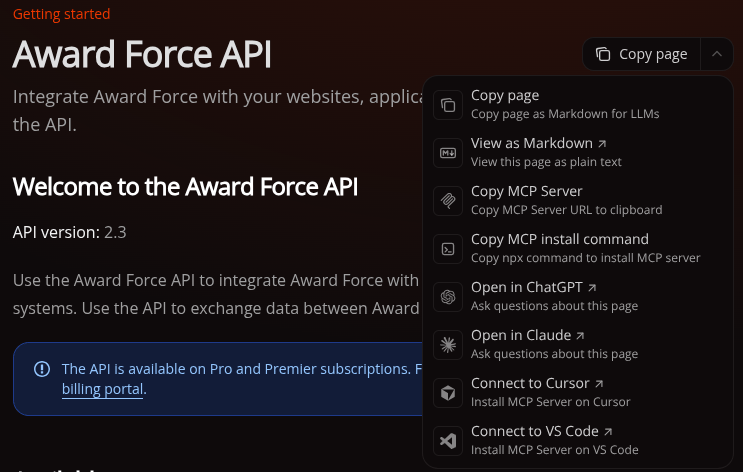 ## Available options
### Page content options
#### Copy page
Copies the page content as plain Markdown, useful for sharing text or basic copy-paste.
#### View as Markdown
Displays the page as raw Markdown text. Use this when pasting content into an AI tool for analysis or questions.
### MCP server integration
#### Copy MCP server URL
Copies the MCP server URL for manual configuration, suited to custom setups or AI tools that support MCP.
One-click connectors for MCP-compatible IDEs are also available from the same dropdown.
### Additional context
**Full documentation context**
`llms-full.txt` bundles the complete Award Force documentation into a single AI-friendly file, available at [`https://docs.awardforce.com/llms-full.txt`](https://docs.awardforce.com/llms-full.txt). Use it when an AI tool needs full context across the Award Force API rather than a single page.
For step-by-step MCP server setup and troubleshooting, see [Docs MCP](/docs/additional/docs-mcp).
## How to use
### For direct AI tool access
1. Open any Award Force documentation page
2. Click the header dropdown
3. Pick the option matching your preferred AI tool
### For manual AI tool usage
1. Open any Award Force documentation page
2. Click the header dropdown
3. Choose **Copy page**
4. Paste the content into your AI tool of choice and start asking questions
### For comprehensive context
* Go to `https://docs.awardforce.com/llms-full.txt`.
* Copy the link or the file contents for full documentation context.
* Use this when a question touches several parts of the Award Force docs.
### For MCP server setup
1. Open any Award Force documentation page
2. Click the header dropdown
3. Choose **Copy MCP server URL**, or use the one-click **Connect to Cursor** or **Connect to VS Code** buttons
4. See [Docs MCP](/docs/additional/docs-mcp) for the full setup walkthrough
## Best practices
### Provide context
* Mention the specific API endpoints involved in your question.
* Describe your use case, such as entries, webhooks, or authentication.
* Name the Award Force resources you are working with.
* For questions spanning multiple topics, pull in `llms-full.txt` for broader context.
### Combine with the MCP server
* Reach for the context menu for quick, one-off AI questions.
* Set up [Docs MCP](/docs/additional/docs-mcp) for full AI tool integration during ongoing development.
* The two work well together. Combine them for the best results.
## Disclaimer
AI agents are not infallible. They can misread instructions, make mistakes, or return inaccurate output. Award Force makes no guarantee about the accuracy of anything an AI agent retrieves or does through this MCP server. Reviewing and verifying any API requests or code generated through agentic workflows is your responsibility.
## Available options
### Page content options
#### Copy page
Copies the page content as plain Markdown, useful for sharing text or basic copy-paste.
#### View as Markdown
Displays the page as raw Markdown text. Use this when pasting content into an AI tool for analysis or questions.
### MCP server integration
#### Copy MCP server URL
Copies the MCP server URL for manual configuration, suited to custom setups or AI tools that support MCP.
One-click connectors for MCP-compatible IDEs are also available from the same dropdown.
### Additional context
**Full documentation context**
`llms-full.txt` bundles the complete Award Force documentation into a single AI-friendly file, available at [`https://docs.awardforce.com/llms-full.txt`](https://docs.awardforce.com/llms-full.txt). Use it when an AI tool needs full context across the Award Force API rather than a single page.
For step-by-step MCP server setup and troubleshooting, see [Docs MCP](/docs/additional/docs-mcp).
## How to use
### For direct AI tool access
1. Open any Award Force documentation page
2. Click the header dropdown
3. Pick the option matching your preferred AI tool
### For manual AI tool usage
1. Open any Award Force documentation page
2. Click the header dropdown
3. Choose **Copy page**
4. Paste the content into your AI tool of choice and start asking questions
### For comprehensive context
* Go to `https://docs.awardforce.com/llms-full.txt`.
* Copy the link or the file contents for full documentation context.
* Use this when a question touches several parts of the Award Force docs.
### For MCP server setup
1. Open any Award Force documentation page
2. Click the header dropdown
3. Choose **Copy MCP server URL**, or use the one-click **Connect to Cursor** or **Connect to VS Code** buttons
4. See [Docs MCP](/docs/additional/docs-mcp) for the full setup walkthrough
## Best practices
### Provide context
* Mention the specific API endpoints involved in your question.
* Describe your use case, such as entries, webhooks, or authentication.
* Name the Award Force resources you are working with.
* For questions spanning multiple topics, pull in `llms-full.txt` for broader context.
### Combine with the MCP server
* Reach for the context menu for quick, one-off AI questions.
* Set up [Docs MCP](/docs/additional/docs-mcp) for full AI tool integration during ongoing development.
* The two work well together. Combine them for the best results.
## Disclaimer
AI agents are not infallible. They can misread instructions, make mistakes, or return inaccurate output. Award Force makes no guarantee about the accuracy of anything an AI agent retrieves or does through this MCP server. Reviewing and verifying any API requests or code generated through agentic workflows is your responsibility.